1タイヤのモデルを作る
1Model the tyre
カーパックでタイヤを用意しなければ、KurumaMod 標準のタイヤ(ノーマル)が自動で付きます。このガイドは、自分でタイヤをデザインしたい人のためのものです。
If your car pack has no tyre of its own, KurumaMod's standard tyre (Normal) is fitted automatically. This guide is for those who want to design their own tyre.
タイヤを Blender で作り、OBJ に書き出すまでです。タイヤはホイールとも車体とも別のファイルで作ります。
This chapter takes a tyre from Blender to an exported OBJ. Tyres are built in a separate file from both the wheel and the body.
最小のタイヤを作る
Make a minimal tyre
- Blender新しいファイルで、ゲージを置く。
Scriptingタブでmodeling_tools/blender_tire_gauge.pyを実行する。同梱のノーマルタイヤの寸法(外径 0.45m・内径 0.334m・幅 0.38m)で、外形の円柱・内径の円柱・踏面の幅・断面・車軸の線・地面が置かれる - Blender外形の円柱に収まるように、タイヤだけを作る。ビードを内径の円柱の両端に合わせる(幅 0.32m はホイールのリムと同じ規格なので、これでどのホイールにも嵌まる)。原点は車軸の中心、回転軸は左右(X)。ホイールは入れない
- Blenderゲージを除いてタイヤだけを選び、OBJ に書き出す。「Selected Only」を入れ、「Triangulated Mesh」は入れない(設定の全体は車の 5 章と同じ)
- ファイル書き出したファイルとテクスチャを置く。
assets/mypack/models/entity/my_tire.obj(.mtlも一緒に)とassets/mypack/textures/entity/my_tire.png
これで、タイヤのモデルができました。換装画面で選べるようにするのは2 章です。
- BlenderIn a new file, place the gauge. Run
modeling_tools/blender_tire_gauge.pyfrom theScriptingtab. Sized after the bundled normal tyre (0.45 m outer radius, 0.334 m inner radius, 0.38 m wide), it places the outer cylinder, the inner cylinder, the tread width, the section, the axle line and the ground - BlenderModel the tyre alone, inside the outer cylinder. Put the beads on the ends of the inner cylinder (the 0.32 m width is the same standard as the wheel rims, so it fits every wheel). Origin at the axle centre, spin axis left–right (X). Do not include a wheel
- BlenderSelect only the tyre (not the gauge) and export it as OBJ. Tick "Selected Only" and leave "Triangulated Mesh" off (the full settings are the same as chapter 5 of the Car guide)
- FilePut the exported file and the texture in your pack:
assets/mypack/models/entity/my_tire.obj(with its.mtl) andassets/mypack/textures/entity/my_tire.png
The tyre model is done. To make it selectable in the parts screen, go to chapter 2.
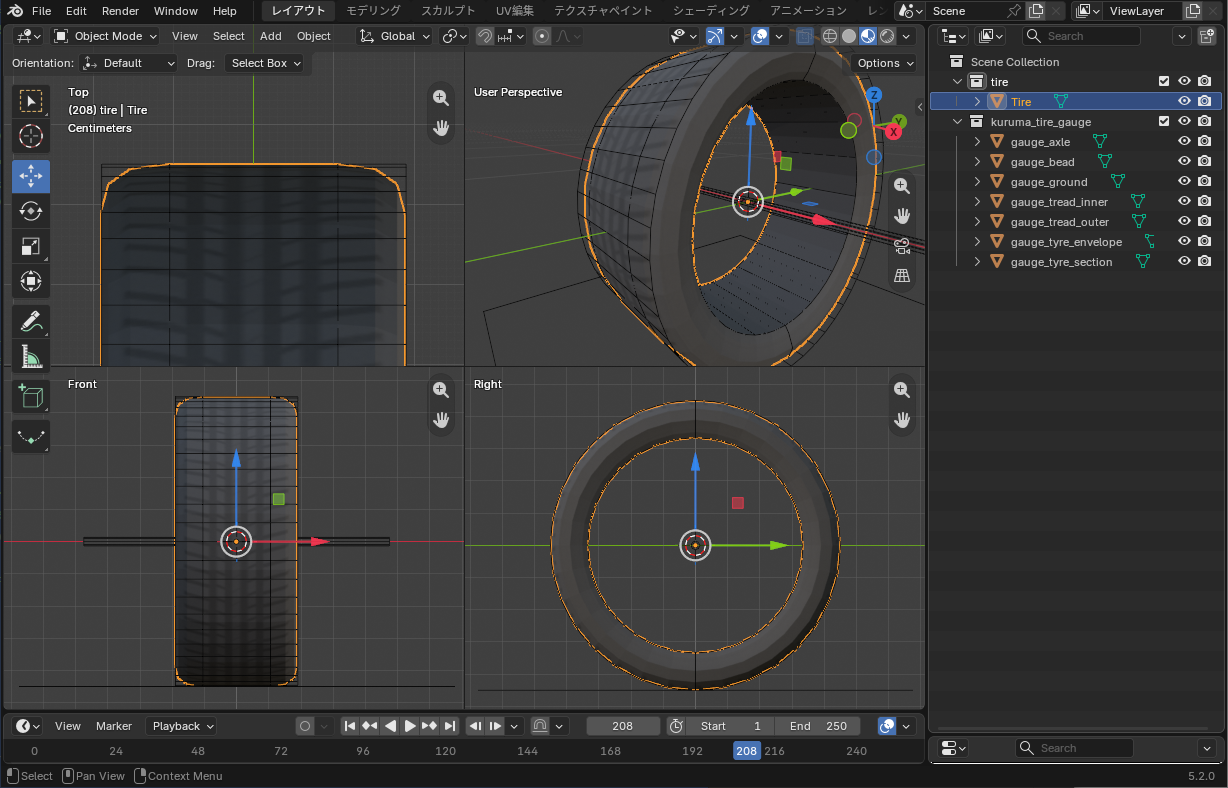
tire.obj)をタイヤのゲージ(blender_tire_gauge.py)に重ねたところ。タイヤは外形の円柱に収め、ビードを内径の円柱の両端に合わせます。タイヤだけの別ファイルで作り、ホイールは入れません。ゲージのオブジェクト(gauge_…)は書き出しても描かれませんtire.obj) laid over the tyre gauge (blender_tire_gauge.py). Keep the tyre inside the outer cylinder and put its beads on the ends of the inner cylinder. Model the tyre alone in its own file, without a wheel. Gauge objects (gauge_…) are not drawn even if exported.必要なときだけ
Only when you need it
仕組みを知りたい(タイヤがどう嵌まるか)
内径と外径はメッシュから測るので、書かなくてかまいません。選んだタイヤは、内径がホイールのリムへ、外径が車のタイヤ半径へ来るように伸び縮みして描かれます。リムの大きいホイールほどサイドウォールが薄くなります。換装画面の「太さ」は、ホイールとタイヤに一緒に効きます。
How it works (how the tyre is fitted)
The inner and outer radii are measured from the mesh, so you need not write them. The picked tyre is stretched so its inner edge sits on the wheel's rim and its outer edge at the car's tyre radius; bigger rims get thinner sidewalls. The parts screen's Width slider acts on the wheel and tyre together.
自分のホイールで、タイヤの嵌まる位置を直したい
タイヤの内径(ビード)を置く半径は、次の順に決まります。
- ホイールの見た目のファイルに
rimRadius(メッシュの寸法・m)が書いてあれば、その値 - 無ければ、ホイールに付けたタイヤ(
Tire。リムだけで作る前の作り方)の内径 - それも無ければ、リムのいちばん外側の半径の 95%
位置が合わないときは、ホイールの見た目のファイル assets/mypack/car_parts/my_wheel.json の wheel に rimRadius を書きます:
{
  "wheel": {
    "model": "mypack:models/entity/my_wheel.obj",
    "texture": "mypack:textures/entity/my_wheel.png",
    "rimRadius": 0.33
  }
}
Fix where tyres sit on my own wheel
The radius where the tyre's inner edge (bead) sits is chosen in this order:
rimRadiusin the wheel's looks file, if written (mesh units, m)- otherwise, the inner edge of a tyre modelled on the wheel (
Tire, the older way of building wheels) - otherwise, 95% of the rim's outermost radius
If tyres sit wrong, add rimRadius under wheel in the wheel's looks file assets/mypack/car_parts/my_wheel.json:
{
  "wheel": {
    "model": "mypack:models/entity/my_wheel.obj",
    "texture": "mypack:textures/entity/my_wheel.png",
    "rimRadius": 0.33
  }
}
うまくいかないとき
- 回るとぶれる・地面に埋まる・浮く … 原点が車軸の中心にない
- タイヤが横倒しで転がる … 回転軸が左右(X)を向いていない。R Y 9 0 で回す
- 選んだタイヤと、ホイールのタイヤが重なる … ホイールのタイヤがリムと同じオブジェクトになっている。リムだけにする(ホイールの 1 章)。
tireで始まる名前の別オブジェクトなら描かれない - サイドウォールが厚すぎる・薄すぎる … 上の「自分のホイールで、タイヤの嵌まる位置を直したい」。それでも合わないときは、タイヤの見た目の
"tire"にinnerRadius/outerRadius(メッシュのタイヤの内径・外径 [m])を書く
When it doesn't work
- Wobbles as it spins, sinks into the ground, or floats — the origin is not at the axle centre
- Rolls on its side — the spin axis does not run left–right (X). Rotate with R Y 9 0
- The picked tyre and the wheel's own tyre overlap — the wheel's tyre is part of the same object as the rim. Keep only the rim (chapter 1 of the Wheel guide). A separate object whose name starts with
tireis not drawn - Sidewalls too thick or too thin — see "Fix where tyres sit on my own wheel" above. If that is not enough, write
innerRadius/outerRadius(the mesh tyre's inner and outer radius [m]) inside the tyre's"tire"
2タイヤを部品にする
2Make a tyre a part
ダート用・オフロード用のような、走りが変わるタイヤを作ります。タイヤはホイールとは別の部品で、路面ごとのグリップが変わります。
Make a tyre that changes how the car drives, such as a gravel or mud-terrain tyre. Tyres are a separate part from wheels, and they change grip on each surface.
最小のタイヤ部品を作る
Make a minimal tyre part
- Blenderタイヤのモデルを作って置く。作り方は 1 章。ここでは
assets/mypack/models/entity/my_tire.objとassets/mypack/textures/entity/my_tire.pngに置いたとする - ファイル見た目のファイルを置く。
assets/mypack/car_parts/my_tire.json(部品と同じファイル名)。必ず"tire"の中に書く:{ "tire": { "model": "mypack:models/entity/my_tire.obj", "texture": "mypack:textures/entity/my_tire.png" } } - ファイル部品のファイルを置く。
data/mypack/car_parts/my_tire.json(ファイル名が部品名):{ "slot": "tire", "tire": { "grip": { "paved": 0.90, "gravel": 1.20 } } } - lang表示名を lang に書く。
"part.mypack.my_tire": "マイタイヤ"
これで、ゲームの G →「パーツ」→「タイヤ」のタブに並びます。数字はノーマルタイヤに対する倍率で、この例は舗装で 0.9 倍・砂利で 1.2 倍のグリップです。
- BlenderBuild the tyre model and put it in your pack. See chapter 1. Here it is at
assets/mypack/models/entity/my_tire.objandassets/mypack/textures/entity/my_tire.png - FileAdd the looks file
assets/mypack/car_parts/my_tire.json(same file name as the part). Always write it inside"tire":{ "tire": { "model": "mypack:models/entity/my_tire.obj", "texture": "mypack:textures/entity/my_tire.png" } } - FileAdd the part file
data/mypack/car_parts/my_tire.json(the file name is the part name):{ "slot": "tire", "tire": { "grip": { "paved": 0.90, "gravel": 1.20 } } } - langAdd the display name to lang.
"part.mypack.my_tire": "My Tyres"
It now appears under G → "Parts" → the "Tyres" tab. The numbers are ratios to the Normal tyre; this one has 0.9× grip on tarmac and 1.2× on gravel.
できあがりの形:
What you end up with:
mypack.jar
├── assets/                       ← 見た目
│   └── mypack/
│       ├── car_parts/
│       │   └── my_tire.json      ← 見た目のファイル("tire" の中)
│       ├── lang/
│       │   ├── en_us.json        ← "part.mypack.my_tire"
│       │   └── ja_jp.json
│       ├── models/
│       │   └── entity/
│       │       ├── my_tire.obj
│       │       └── my_tire.mtl
│       └── textures/
│           └── entity/
│               └── my_tire.png
└── data/                         ← 素性
    └── mypack/
        ├── car_parts/
        │   └── my_tire.json      ← 部品のファイル("slot": "tire" と性能)
        └── cars/
            └── <車>.json         ← 純正にするなら default_parts.tire(任意)
mypack.jar
├── assets/ <- looks
│ └── mypack/
│ ├── car_parts/
│ │ └── my_tire.json <- looks file (inside "tire")
│ ├── lang/
│ │ ├── en_us.json <- "part.mypack.my_tire"
│ │ └── ja_jp.json
│ ├── models/
│ │ └── entity/
│ │ ├── my_tire.obj
│ │ └── my_tire.mtl
│ └── textures/
│ └── entity/
│ └── my_tire.png
└── data/ <- what it is
└── mypack/
├── car_parts/
│ └── my_tire.json <- part file ("slot": "tire" and performance)
└── cars/
└── <car>.json <- default_parts.tire to make it stock (optional)assets/ と data/ の car_parts/ に、同じファイル名で 1 つずつ置きます。
One file each in the car_parts/ folders of assets/ and data/, with the same file name.
必要なときだけ
Only when you need it
見た目は標準のまま、性能だけ変えたい
1 章(モデル)と、下の手順の 1・2 を飛ばし、部品のファイルと lang だけを置きます。見た目は KurumaMod 標準のタイヤになります。
Change only the performance, keep the standard look
Skip chapter 1 (the model) and steps 1–2 below, and add only the part file and lang. It looks like KurumaMod's standard tyre.
性能の数字を決めたい
書ける項目はこれで全部です。どれもノーマルタイヤに対する倍率で、書かなかったものは 1 です。
{
  "slot": "tire",
  "tire": {
    "stiffness": 0.85,
    "grip":    { "paved": 0.88, "dirt": 1.20, "gravel": 1.25, "sand": 1.10, "snow": 1.10 },
    "rolling": { "paved": 1.15 }
  }
}grip… その路面でのグリップrolling… その路面での転がり抵抗。大きいほど進みにくいstiffness… 舵を切ってから力が立ち上がるまでの鋭さ。ブロックの大きいタイヤほど小さくする- 路面の名前は
paved(舗装)・dirt(土・草)・gravel(砂利)・sand(砂)・snow(雪)・ice(氷) - 倍率は 0.3〜3.0 に丸めて読む
同梱のタイヤの値と、既定の車での効き目(比べる目安):
| stiffness | grip | rolling | 効き目 | |
|---|---|---|---|---|
| ノーマル | 1 | すべて 1 | すべて 1 | 舗装の横 G 0.93・砂利 0.62・砂 0.48 |
| ダート | 0.85 | 舗装 0.88・土 1.20・砂利 1.25・砂 1.10・雪 1.10 | 舗装 1.15 | 舗装 0.84・砂利 0.77・砂 0.54。砂利の制動 31.9→25.7m |
| オフロード | 0.75 | 舗装 0.80・土 1.15・砂利 1.10・砂 1.35・雪 1.25・氷 1.05 | 舗装 1.40・土 0.85・砂 0.70・雪 0.80 | 舗装 0.77・砂利 0.68・砂 0.68。砂の 0-100 7.15→6.18 秒 |
どの路面でも強いタイヤは作らないでください。得意な路面があれば苦手な路面がある、のがタイヤを選ぶ意味です。
Choose the numbers
These are all the keys. Every number is a ratio to the Normal tyre, and anything left out is 1.
{
  "slot": "tire",
  "tire": {
    "stiffness": 0.85,
    "grip":    { "paved": 0.88, "dirt": 1.20, "gravel": 1.25, "sand": 1.10, "snow": 1.10 },
    "rolling": { "paved": 1.15 }
  }
}grip— grip on that surfacerolling— rolling resistance on that surface. Bigger means harder to keep movingstiffness— how sharply force builds once you steer. Lower it for chunky tread- Surface names:
paved,dirt(dirt and grass),gravel,sand,snow,ice - Ratios are clamped to 0.3–3.0
The shipped tyres, and what they do on the default car, for reference:
| stiffness | grip | rolling | Effect | |
|---|---|---|---|---|
| Normal | 1 | all 1 | all 1 | lateral g 0.93 paved, 0.62 gravel, 0.48 sand |
| Gravel | 0.85 | paved 0.88, dirt 1.20, gravel 1.25, sand 1.10, snow 1.10 | paved 1.15 | 0.84 paved, 0.77 gravel, 0.54 sand. Gravel braking 31.9→25.7 m |
| Mud terrain | 0.75 | paved 0.80, dirt 1.15, gravel 1.10, sand 1.35, snow 1.25, ice 1.05 | paved 1.40, dirt 0.85, sand 0.70, snow 0.80 | 0.77 paved, 0.68 gravel, 0.68 sand. Sand 0–100 7.15→6.18 s |
Please don't make a tyre that wins everywhere. A tyre that is good somewhere should be worse somewhere else; that is what makes the choice matter.
決まった車種にだけ付けたい・並ぶ順を変えたい
ホイールと同じく、data/mypack/car_parts/my_tire.json に cars と order を書けます(ホイールの 2 章)。
{
  "slot": "tire",
  "order": 30,
  "cars": ["mypack:kei"],
  "tire": { "grip": { "paved": 0.90, "gravel": 1.20 } }
}
Only fit certain cars, or change the order
As with wheels, cars and order go in data/mypack/car_parts/my_tire.json (chapter 2 of the Wheel guide).
{
  "slot": "tire",
  "order": 30,
  "cars": ["mypack:kei"],
  "tire": { "grip": { "paved": 0.90, "gravel": 1.20 } }
}
うまくいかないとき
- タブに並ぶが、走りがノーマルと同じ …
"tire": { ... }が書かれていない(ログに出る) - 一部の路面だけ効かない … 路面の名前の綴りが違う。知らない名前はログに出て無視される
- 見た目が KurumaMod 標準のタイヤのまま … 見た目のファイルで
"tire": { ... }の中に書いていない。またはassets/側のファイル名がdata/側と違う - 形がおかしい・重なる・サイドウォールの厚さが変 … 1 章の「うまくいかないとき」
When it doesn't work
- Listed, but drives like Normal —
"tire": { ... }is missing (the log says so) - Only some surfaces have no effect — a surface name is misspelt. Unknown names are logged and ignored
- Still looks like KurumaMod's standard tyre — the looks file is not written inside
"tire": { ... }, or theassets/file name differs from thedata/one - Wrong shape, overlapping, or odd sidewalls — see "When it doesn't work" in chapter 1
3チェックリスト
3Checklist
見落としやすいところを並べます。症状が出てから探すときは配布の 3 章へ。
What is easy to miss. If something is already wrong, go to chapter 3 of Shipping.
書き出す前(Blender)
Before exporting (in Blender)
- タイヤだけを別ファイルで作った(ホイールは入れない)・原点は車軸・回転軸は X
- 外形の円柱に収め、ビードを内径の円柱の両端に合わせた
- Tyre alone in its own file (no wheel), origin at the axle, spin axis X
- Kept inside the outer cylinder, beads on the ends of the inner cylinder
ゲームで見る前
Before loading it in game
- 部品のファイル(
data/)に"slot": "tire"と"tire": { ... }を書いた - 見た目のファイル(
assets/)は"tire"の中に書き、ファイル名を部品と同じにした
- The part file (
data/) has"slot": "tire"and"tire": { ... } - The looks file (
assets/) is written inside"tire"and has the same file name as the part
付録 A. タイヤの全項目
Appendix A. Every tyre key
素性 — data/<pack>/car_parts/<part>.json
| キー | 型 | 既定値 | 意味 |
|---|---|---|---|
slot | 文字列 | 必須 | "tire" |
order | 整数 | 100 | 換装画面に並ぶ順 |
cars | 車種 id の配列 | (すべての車種) | 付けられる車種。読める値が 1 つも無ければ、その部品は捨てられる |
tire.stiffness | 数字 | 1 | 横・縦の剛性の倍率(よれやすさ。0.3〜3.0) |
tire.grip.<路面> | 数字 | 1 | その路面でのグリップの倍率。路面は paved・dirt・gravel・sand・snow・ice |
tire.rolling.<路面> | 数字 | 1 | その路面での転がり抵抗の倍率 |
Definition — data/<pack>/car_parts/<part>.json
| Key | Type | Default | Meaning |
|---|---|---|---|
slot | string | required | "tire" |
order | integer | 100 | Position in the parts screen |
cars | array of car ids | (every car) | Which cars can fit it. If none of the values can be read, the part is dropped |
tire.stiffness | number | 1 | Scale on lateral and longitudinal stiffness (tread squirm; 0.3 to 3.0) |
tire.grip.<surface> | number | 1 | Grip on that surface. Surfaces: paved, dirt, gravel, sand, snow, ice |
tire.rolling.<surface> | number | 1 | Rolling resistance on that surface |
見た目 — assets/<pack>/car_parts/<part>.json("tire": { ... } の中。いちばん外側には書けない)
| キー | 型 | 既定値 | 意味 |
|---|---|---|---|
model | id | KurumaMod 標準のタイヤ | タイヤの OBJ(タイヤだけ。原点は車軸の中心) |
texture | id | kurumamod:textures/entity/tire.png | タイヤのテクスチャ |
innerRadius | 数字 | (測る) | メッシュのタイヤの内径 [m]。測った値がおかしいときだけ書く |
outerRadius | 数字 | (測る) | メッシュのタイヤの外径 [m]。同上 |
Looks — assets/<pack>/car_parts/<part>.json (inside "tire": { ... }; not at the top level)
| Key | Type | Default | Meaning |
|---|---|---|---|
model | id | KurumaMod's own tyre | Tyre OBJ (tyre only, origin at the axle centre) |
texture | id | kurumamod:textures/entity/tire.png | Tyre texture |
innerRadius | number | (measured) | The mesh's inner tyre radius [m]. Only write it if the measured one is wrong |
outerRadius | number | (measured) | The mesh's outer tyre radius [m]. Likewise |
車の側 — data/<pack>/cars/<car>.json のいちばん外側
| キー | 型 | 意味 |
|---|---|---|
default_parts.tire | 部品 id | その車の純正のタイヤ。書かなければ kurumamod:tire_normal |
On the car — top level of data/<pack>/cars/<car>.json
| Key | Type | Meaning |
|---|---|---|
default_parts.tire | part id | The car's stock tyre. Left out, kurumamod:tire_normal |
KurumaMod — 諸元の全項目は車の付録 A。ゲージスクリプトは modeling_tools/blender_gauge.py・modeling_tools/blender_wheel_gauge.py・modeling_tools/blender_tire_gauge.py。
KurumaMod — every spec key is in Appendix A of the Car guide. The gauge scripts are modeling_tools/blender_gauge.py, modeling_tools/blender_wheel_gauge.py and modeling_tools/blender_tire_gauge.py.